
Summary
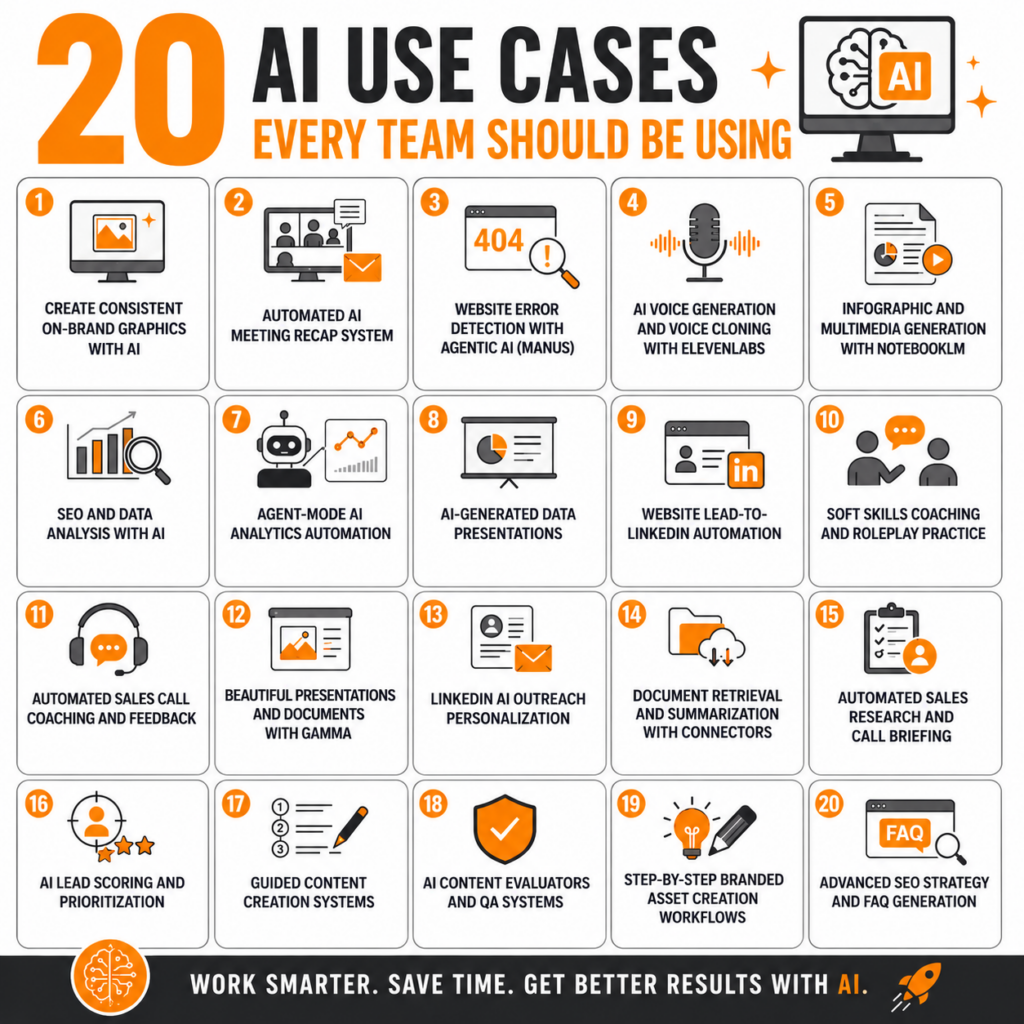
- Why Strategic AI Use Cases Matter – I have found that the biggest AI results come from building systems and workflows instead of relying on one-off prompts.
- AI for Content and Visual Creation – I use AI to create on-brand graphics, presentations, videos, voiceovers, FAQs, and content assets faster without sacrificing quality.
- AI for Workflow Automation – I use AI to automate meeting recaps, sales research, lead management, and document retrieval so repetitive work happens automatically.
- AI for Data Analysis and SEO – I use AI to analyze SEO data, identify website errors, build keyword strategies, and create presentations from complex datasets.
- AI for Leadership, Coaching, and Quality Control – I use AI to improve communication skills, evaluate content quality, guide content creation, and strengthen strategic thinking.
Why Strategic AI Use Cases Matter
Most people use AI in a very basic way. They ask a question, get an answer, and move on. While that can absolutely save time, I have found that the biggest value from AI comes when I stop thinking about prompts and start thinking about systems.
At Boot Camp Digital, we use AI across marketing, content creation, training development, leadership coaching, workflow automation, SEO, and sales enablement. The key difference is that we are not simply asking AI to create random outputs. We are building processes where AI helps us scale expertise, improve consistency, and automate repetitive work.
Over time, my team and I have continued discovering new use cases and refining the workflows that work best. Many of these systems started as small experiments and evolved into repeatable tools we now use regularly.
Below are 20 strategic AI use cases that I personally use or have built into our workflows. My goal is not just to show you what AI can do, but to help you think more strategically about how you can apply it in your own business.
AI for Content and Visual Creation
1. Create Consistent On-Brand Graphics with AI
What this means
One of the first problems we ran into with AI-generated images was consistency. AI could generate graphics quickly, but the outputs did not always look like our brand. The colors, spacing, typography, and overall design style often felt disconnected from the rest of our content.
I realized that if we wanted to scale visual content creation with AI, we needed a way to make sure every graphic still looked like Boot Camp Digital.
How I use it
We built a custom graphics creator GPT trained on our brand colors, fonts, formatting standards, and platform-specific style guidelines. We also trained it on how different platforms should be formatted, including square Instagram graphics and presentation visuals.
Instead of starting from scratch every time, the AI already understands the structure and visual standards we want before we even enter the prompt.
Example
If I ask the GPT to create an Instagram image about AI agents transforming business workflows, I do not get a random futuristic robot graphic. Instead, I get a properly formatted branded image that matches our style and includes the messaging structure we typically use.
I also learned that the outputs improve dramatically when I provide strategic direction instead of vague prompts. Rather than saying “make a graphic about AI,” I usually provide the exact business points I want emphasized.
2. Turn Source Materials into Accurate Content with NotebookLM
What this means
One of the biggest problems with general AI tools is that they often blend your information with everything they learned from the internet. That can create inaccuracies or content that drifts away from your original expertise.
For educational content, training materials, and intellectual property, that becomes a major issue.
How I use it
I use NotebookLM because it relies on Retrieval-Augmented Generation, or RAG. This means the AI creates content only from the source materials I upload instead of mixing in outside information.
I can upload transcripts, webinar recordings, training documents, or course materials and turn them into new assets very quickly.
Example
After uploading one of our crash course transcripts, I used NotebookLM to generate infographics, summaries, quizzes, and even short videos based entirely on the training content we originally created.
This allows me to scale educational content while keeping it aligned with our actual expertise and teaching style.
3. Produce Professional Voiceovers with ElevenLabs
What this means
Recording videos can be incredibly time-consuming. Even for a short tutorial, I would normally need recording time, lighting, makeup, screen captures, editing, and post-production work.
Sometimes the content does not actually require me to appear on camera.
How I use it
I use ElevenLabs to create AI-generated voiceovers for tutorials, onboarding videos, and educational content. The platform allows me to either clone my voice or create a dedicated business voice.
Instead of filming myself, I simply write the script and generate the narration.
Example
When we created onboarding materials for our AI Bootcamp, I realized the goal was helping people navigate the platform, not seeing my face on camera. Using AI narration allowed us to create a polished walkthrough much faster while still sounding professional.
It also made updates easier because we could revise the script without rerecording the entire video.
4. Create AI-Powered Infographics and Multimedia Assets
What this means
I have found that AI can dramatically speed up the creation of educational assets when the workflow is structured properly.
Rather than manually designing every infographic or presentation, I can use AI to generate first drafts from source content.
How I use it
Inside NotebookLM, I can upload source materials and then choose the output format I want, including reports, infographics, quizzes, slide decks, and videos.
I also provide brand colors and visual guidance to improve the outputs.
Example
When I uploaded a webinar transcript, I was able to quickly create branded educational graphics that summarized the session for social media and promotional content.
The process takes far less time than building every asset manually from scratch.
5. Build Better Presentations with Gamma
What this means
Creating visually strong presentations is often more difficult than creating the content itself. I can usually develop the ideas quickly, but making the slides visually compelling takes much longer.
That is where Gamma became extremely useful.
How I use it
I use Gamma to improve presentations and documents that already exist. Instead of asking AI to invent the entire presentation, I typically upload a draft and ask Gamma to improve the design and structure.
Gamma does a particularly good job visualizing concepts and creating infographic-style layouts.
Example
One presentation I uploaded was structurally solid but visually weak. Gamma dramatically improved the flow, layouts, and overall design quality. Not every slide was perfect, but it gave me an 80% complete presentation much faster than starting from scratch.
6. Create Smarter Website FAQs with Specialized AI Tools
What this means
Some AI tools are trained for very specific business functions. I have found these specialized systems can outperform general-purpose AI in certain areas.
FAQ creation turned out to be one of those areas.
How I use it
I used Sintra to create FAQ sections for our website because the tool combines company-specific knowledge with specialized FAQ-generation training.
Instead of producing generic answers, it creates responses that are more aligned with our business and our customers.
Example
When I compared FAQ outputs from Sintra against general AI tools, the Sintra responses were noticeably more relevant, strategic, and customer-focused.
The answers felt like they actually anticipated real user questions instead of simply rewriting webpage copy.
AI for Workflow Automation
7. Automate Meeting Recaps and Follow-Up Emails
What this means
AI meeting summaries are useful, but I realized the summary itself was not the biggest time saver. The real opportunity was automating everything that happens after the meeting.
Without automation, I still had to write follow-up emails, find participants, and summarize next steps manually.
How I use it
I built a Zapier workflow that reads Zoom transcripts, identifies the corresponding calendar event, determines the meeting type, and drafts follow-up emails automatically.
The workflow also adjusts the messaging based on whether the call was a sales conversation, client meeting, or internal discussion.
Example
For sales calls, the workflow drafts a Gmail message in our brand voice and includes all meeting participants automatically. I still review the email before sending it, but the repetitive administrative work is already done.
8. Retrieve and Summarize Documents with AI Connectors
What this means
One of the simplest but most useful AI workflows I use involves connectors to tools like Dropbox and Google Drive.
Instead of manually searching through folders, AI can locate and summarize documents for me.
How I use it
I connect AI tools directly to our business files and ask the AI to retrieve specific course overviews, training materials, or documents.
Once found, the AI can summarize, rewrite, or repurpose the information.
Example
When I need a quick course summary for a proposal, I can ask AI to locate the course overview document in Dropbox and create a short marketing description automatically.
9. Build Automated Sales Research Briefs
What this means
Sales preparation often gets rushed because research happens right before the meeting.
I wanted a system that proactively prepared research before I even started thinking about the call.
How I use it
I built an AI sales-call briefer that reviews my calendar, identifies upcoming sales calls, researches the company and contact, evaluates service alignment, and sends me a briefing document 24 hours before the meeting.
The workflow also stores the brief inside Google Drive automatically.
Example
Instead of scrambling before a sales call, I receive a strategic overview of the company’s likely needs, industry context, and potential opportunities the day before the meeting.
10. Turn Website Leads into LinkedIn Connections
What this means
Most businesses rely heavily on email follow-up after someone downloads a resource or fills out a form.
I wanted a way to deepen the relationship beyond email.
How I use it
We created a workflow that researches incoming leads, finds them on LinkedIn, and adds them to personalized outreach campaigns using Meet Alfred.
The system also enriches lead data before outreach begins.
Example
Someone might download a free AI resource without requesting a consultation. Later, they receive a thoughtful LinkedIn connection request referencing our shared industry interests, which often leads to meaningful conversations.
11. Score and Prioritize Leads Automatically
What this means
Not all leads are equally valuable, and most CRMs are limited in how intelligently they evaluate potential opportunities.
I wanted a system that combined AI research with lead scoring.
How I use it
The workflow evaluates incoming leads based on role, seniority, company size, marketing team size, and likely budget potential.
It then creates ranked reports of higher-value opportunities.
Example
Every week, our team receives prioritized lead lists instead of reviewing every inquiry equally. That helps us focus our time where there is the highest strategic fit.
AI for Data Analysis and SEO
12. Find Website Errors with Agentic AI
What this means
Traditional AI tools struggle with large-scale website analysis because they cannot reliably process hundreds or thousands of pages at once.
Agentic AI tools can handle much larger workflows.
How I use it
I used Manus to crawl our website using sitemap files and identify content and technical issues automatically.
The tool categorized findings into actionable reports.
Example
Instead of manually checking pages one by one, I received a categorized spreadsheet identifying technical errors, content gaps, and optimization opportunities.
13. Analyze SEO Data from Multiple Sources
What this means
AI becomes much more valuable when it can combine multiple data sources instead of analyzing a single report in isolation.
That is where I have seen major value for SEO analysis.
How I use it
I upload Search Console, Google Analytics, and SEMrush reports into AI systems and ask for strategic analysis and opportunities.
The AI synthesizes the information into insights and recommendations.
Example
Rather than simply reporting traffic numbers, AI identifies patterns, recommends improvements, and highlights opportunities we may have missed manually.
14. Use Agent Mode to Access and Analyze Platforms
What this means
Some AI tools can now operate their own browser and complete actions similarly to a human user.
This opens the door for more advanced automation.
How I use it
I use AI agent mode to access tools, pull data, and complete analysis workflows without manually exporting every report.
In some cases, I also use direct connectors instead.
Example
Instead of downloading SEO reports manually, I can ask AI to analyze platform data and summarize opportunities directly from the source.
15. Build Keyword Strategies with Claude
What this means
I have found Claude particularly useful for complex analytical workflows because it tends to approach problems in a more structured and methodical way.
That became especially helpful for SEO planning.
How I use it
I use Claude to build keyword strategies using Search Console, Analytics, and SEMrush data.
The AI asks for additional information, structures the process, and creates recommendations.
Example
Claude helped me identify SEO quick wins, organize keyword clusters, and build a stronger strategic SEO roadmap than I would have created manually in the same amount of time.
16. Turn Raw Data into Presentations
What this means
Data becomes much more valuable when it is visualized clearly.
I use AI to transform raw information into polished presentations and summaries.
How I use it
I upload audience feedback, survey responses, or analytics data and ask AI to create presentation summaries with visuals and insights.
The AI identifies the most important data points automatically.
Example
After a training program, I uploaded participant feedback and had AI generate a presentation summarizing outcomes and audience response for the client.
AI for Leadership, Coaching, and Quality Control
17. Practice Leadership Conversations with AI Roleplay
What this means
Soft skills are difficult to practice because most real-world conversations happen in high-pressure situations.
AI creates a safe environment for practice and feedback.
How I use it
I use AI roleplay scenarios to practice coaching, conflict management, and leadership conversations.
After the scenario, I ask AI to evaluate my communication style.
Example
During one exercise, AI pointed out that I moved into “fixing mode” too quickly instead of asking more questions and creating accountability.
18. Automate Coaching Feedback from Sales Calls
What this means
I realized that coaching only works consistently when feedback becomes part of the system.
Otherwise, important learning opportunities get missed.
How I use it
I built an automation that reviews sales-call transcripts and emails performance feedback after every conversation.
The workflow evaluates tactics, positioning, and communication effectiveness.
Example
Instead of manually reviewing calls one at a time, I receive ongoing coaching insights automatically after meetings conclude.
19. Build Guided Content Creation Systems
What this means
One of the biggest problems with AI content is poor inputs.
I realized that better outputs require better strategic guidance before the writing even begins.
How I use it
We built guided content creators that force users to define audience, funnel goals, objectives, and messaging before AI starts writing.
The AI evaluates each response before moving to the next step.
Example
If someone says the target audience is “marketers,” the AI pushes for more specificity before generating the email or campaign content.
20. Separate AI Creation from AI Evaluation
What this means
I learned quickly that even strong AI-generated content still needs quality control.
That is why we separate the writing process from the evaluation process.
How I use it
We built evaluator GPTs that review content for tone of voice, legal standards, visual consistency, formatting, and brand compliance.
The evaluator catches issues the creator may miss.
Example
One team created a visual evaluator because their designers kept giving the same feedback repeatedly. The AI now identifies many of those issues automatically before a human review even happens.
Conclusion: Use AI as a Strategic Partner
The biggest AI opportunities do not come from random prompts. They come from building workflows, systems, and processes that help you scale expertise, automate repetitive work, improve consistency, and make better decisions.
Over time, I have found that AI works best when I treat it like a strategic partner instead of just a productivity shortcut. The more intentionally I structure the workflow, the more valuable the results become.
If you are trying to improve your own AI implementation, start small. Identify one repetitive process in your business and ask yourself how AI could improve the quality, speed, consistency, or personalization of that process.
That is where AI starts becoming transformational instead of simply convenient.