

You probably already have people using AI at work.
Your marketing team may use ChatGPT for content. Sales may use Copilot to prep for meetings. Someone in HR figured out how to summarize a 40-page document in five minutes. There’s probably at least one person doing something with AI that nobody else even knows about.
The problem isn’t getting people to try AI. The problem is figuring out what’s actually working.
What should you repeat? What should you scale? Where are the gaps? And where are people spending time on AI without much to show for it?
That’s what an AI maturity model helps you figure out. It’s a practical way to see where you stand today across leadership, people, technology, workflows, governance, and results.
In this article, you’ll learn:
- The 5 Levels of AI Maturity: See what AI adoption looks like as it develops.
- The 6 Areas to Assess: Score the parts of your organization that affect AI adoption.
- How to Find Your Biggest AI Gaps: Compare where you are with where you want to be 12 months from now.
- How to Choose Better AI Use Cases: Focus on work where AI can create a measurable result.
- How to Make Progress in 90 Days: Use Find → Fit → Fly to test and improve one real use case.
The 5 Levels of AI Maturity
The easiest way to think about AI maturity is to look at how AI actually shows up in the work, not how many licenses you’ve bought.
Level 1: Experimenting
At Level 1, employees are mostly figuring things out on their own.
Someone uses AI to draft emails. Someone else summarizes meetings with it. A marketer asks ChatGPT for headline ideas. A manager uses it to build a project plan.
There may already be some genuinely smart uses happening here. I wouldn’t dismiss this stage. I’d pay close attention to it.
Employees often find useful AI applications before leadership does. They’re the ones doing the repetitive, annoying work every day, so they know exactly where it hurts.
If you’re at this stage, find those people. Ask what they’re doing and what’s actually saving them time. Sometimes the best AI use case in the company comes from one employee who got tired of doing the same task every Friday. That beats a room full of people brainstorming broad “AI opportunities.”
Level 2: Adopting
At Level 2, teams start using AI in more consistent ways.
Marketing shares prompts. Sales uses AI for prospect research. HR has a few standard ways to draft or summarize information.
This is also where I often see teams solving the same problem separately. Marketing writes its own AI guidelines. Sales writes its own. HR builds a prompt library. Three departments spend weeks each solving almost the same problem.
I’ve watched this happen with digital tools for years. Every department assumes its needs are completely different, and then you look at what they built and find a lot of overlap.
You don’t need every department using AI exactly the same way. You do need a simple way to share what’s working.
Level 3: Integrating
Level 3 is where AI becomes part of how work actually gets done.
Ask ChatGPT to “write a blog post” and it will write one. Will it be good? Maybe. Will it sound like you, include the right examples, and say something worth reading? Spoiler alert: probably not without more direction.
The better approach breaks the work into decisions first: What’s the topic and the angle? Which examples make the point? Which parts can AI actually help with, and which ones are still yours to make?
Now AI has a clear job inside the process instead of trying to do the whole thing. The same approach works for reporting, customer service, research, presentations, and sales prep.
Leadership tends to start paying real attention around this point too, and that’s the right instinct. This is also where you need a few ground rules for what AI shouldn’t touch without a person checking it first.
Level 4: Scaling
At Level 4, AI has stopped being something you’re trying and become something you rely on.
Say your customer service team piloted AI-drafted responses. Before, customers waited about four hours; afterward, the average dropped to 45 minutes, and quality held up. That’s not an interesting experiment anymore. It’s a workflow with proof behind it.
Proof is what lets you scale with confidence: to another team, with the training they actually need, using whatever parts are already standardized. Governance keeps pace here instead of playing catch-up, and using AI this way starts to feel like normal work, not a special project.
I’d rather scale a boring workflow with a track record than roll out a flashy AI tool nobody can connect to a result.
Level 5: Leading
At Level 5, using AI well isn’t a project anymore. It’s just part of how you compete.
You know how to find a good opportunity, test it, measure it, and expand what works. You also know when something isn’t worth your time.
Every week there’s another AI tool somebody wants to try. Without clear priorities, they can all look interesting. Clear priorities make most of those decisions easy.
I’ve said this about digital marketing for years: do fewer things better. The same applies here.
The 6 Areas to Assess for AI Maturity
Now apply those five levels to six parts of your organization.
Score each area from 1 to 5, using the maturity levels as your guide:
- 1 = Experimenting
- 2 = Adopting
- 3 = Integrating
- 4 = Scaling
- 5 = Leading
Don’t worry about getting the number exactly right. You’re after an honest picture of what’s actually happening.
You might be a 4 in technology and a 1 in measurement. Strong leadership support, barely any employee training. Most organizations look uneven like that, and the unevenness is exactly what tells you where to focus.
1. Strategy and Leadership
Start with the business, not the tool.
I see organizations jump straight to “Should we buy ChatGPT Enterprise?” before they’ve decided what they actually want AI to improve. That’s backwards.
Maybe salespeople spend too much time prepping for meetings. Maybe customer service is slow. Maybe managers lose half a day every week building reports nobody enjoys making. Start there.
Decide who owns AI across the organization, and give that person enough authority to set priorities and make decisions. Shared ownership sounds good in a meeting; in practice it usually means nobody’s really responsible.
Then build a realistic plan for the next 12 months: three clear priorities beat a 70-slide strategy deck every time.
2. People and Skills
You can give everyone access to AI and still get almost nothing out of it. People have to know how to use it for their specific job.
General training is a fine starting point: what AI does well, where it makes mistakes, what information is safe to share, why the output still needs a human check. Then make it specific.
Train salespeople on a real sales meeting. Give marketers a real campaign to work on. Have managers practice with the documents and decisions they deal with every week.
People learn faster when they can immediately see how a skill applies to their own work. “Here are 20 things AI can do” gets attention. “Here’s how to cut 45 minutes from your Monday sales prep” gets used.
3. Tools and Technology
Before you buy more technology, take inventory.
You probably already have AI built into Microsoft, Google, Adobe, Salesforce, or other platforms you’re already paying for. Your teams may also have subscriptions nobody’s bothered to document.
I’ve watched this exact thing happen with marketing technology for years: someone buys a tool because it looks useful, another team buys something similar, and six months later you’re paying for three platforms while using about 20% of each one. AI can go the same way.
Figure out what you already have and what people actually use, then cut the duplicates. Buy something new only when you can clearly explain why you need it.
4. Processes and Workflows
This is probably where I’d spend the most time.
Most people start with individual tasks because they’re easy to see: you write an email and AI writes it faster, you summarize a document and AI does it in 30 seconds. But the meaningful improvements usually come from looking at the full process, not the one task inside it.
Say your weekly marketing report takes six hours. AI writes the executive summary in five minutes instead of 30. That’s a 25-minute win. Fine. Where did the other five-plus hours go?
Probably two hours gathering data, then cleaning a spreadsheet, building charts, copying everything into PowerPoint, and checking the numbers. If I were sitting with that team, I wouldn’t spend much more time on the summary. I’d want to know why we’re still pulling data by hand.
Map the full workflow and break it into smaller steps. That’s where the real time is hiding.
5. Governance and Risk
Your AI policy needs to answer normal work questions: Can employees put customer information into ChatGPT? What needs a human fact-check before it goes out the door?
Those are the decisions people actually face day to day.
I’ve seen organizations make AI governance so complicated that employees just stop reading it. Then they either avoid useful tools entirely or start making their own calls about what’s allowed. If someone has to read ten pages to figure out whether they can paste text into an AI tool, the policy isn’t doing its job.
Give people examples instead. Show them what’s fine, what’s risky, and what needs approval, and keep it useful for the decisions people actually make during a normal workday.
6. Results and ROI
If your goal was saving time, measure time. Wanted faster customer service? Track response or resolution time. Wanted more output? Check quality along with the numbers.
This gets missed more often than you’d think. The AI platform can tell you 2,000 employees logged in last month. That tells you people used it, not whether they saved time, cut costs, or made anything better.
You also need a baseline. If reporting takes six hours today, write that number down before anything changes. Otherwise, three months from now you’ll be saying “I think this used to take longer,” and that’s not measurement.
Use Your AI Maturity Gaps to Decide What to Do Next
Once you have your six current scores, decide where you want each area to land 12 months from now.
Your assessment might look like this:
- Strategy and Leadership: 3 → 4
- People and Skills: 2 → 4
- Tools and Technology: 4 → 4
- Processes and Workflows: 2 → 4
- Governance and Risk: 3 → 4
- Results and ROI: 1 → 4
If these were my scores, I wouldn’t spend the next budget meeting talking about another AI platform. Technology’s already a 4. Measurement’s a 1. Skills and workflows are both 2s. Fix those first.
That’s why I like scoring the areas separately. It shows you exactly what’s holding you back, so you can put your time and money there instead of guessing.
Choose an AI Use Case You Can Actually Work On
A good AI use case should be painfully specific.
“Use AI in marketing” isn’t. “Reduce weekly campaign reporting from six hours to three” is.
Now you know exactly what you’re trying to improve. You can map the process, find the slow parts, test changes, and compare the result to what you were doing before.
Give the use case one owner, too. Someone has to be responsible for moving it forward. Everyone else can contribute, but somebody owns the result.
Define what success looks like and what happens in the next 30 days. If you can’t explain the use case in a sentence or two, narrow it down further.
Use Find → Fit → Fly to Make Progress in 90 Days
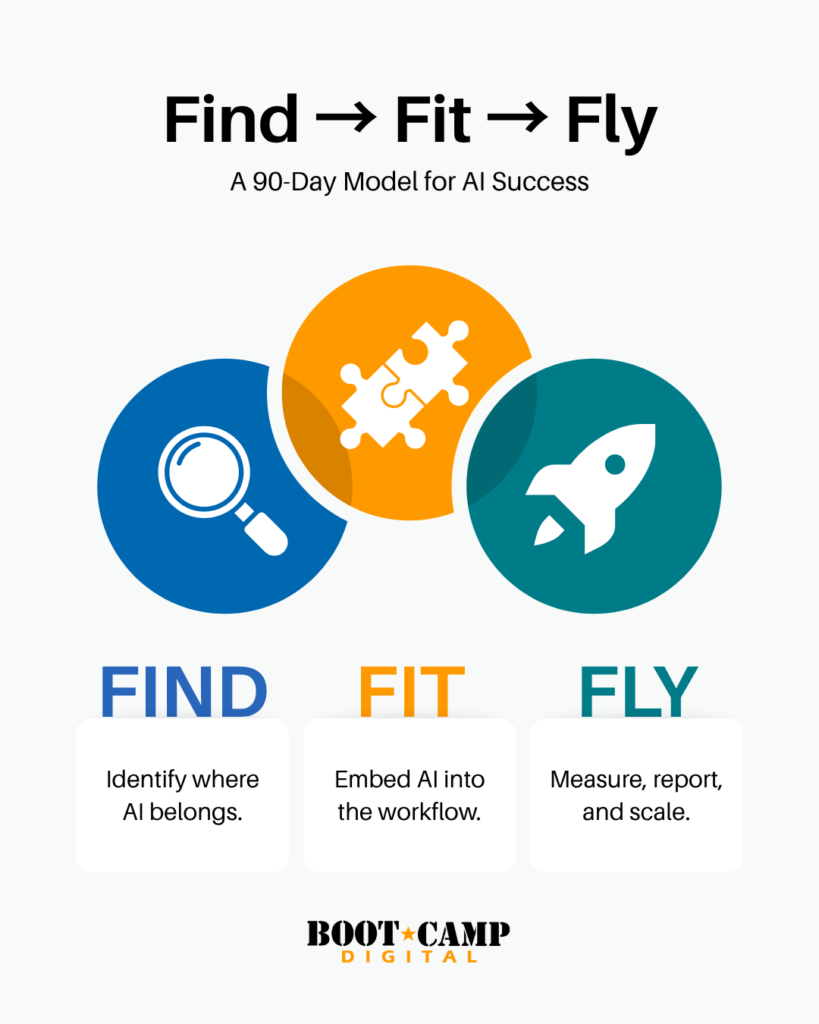
The AI Maturity Assessment uses a 90-day Find → Fit → Fly framework: find a real opportunity, fit AI into the actual work, then use the results to decide what happens next.
Month 1: Find
Look at how people work today. Which processes eat up hours every week? The ones that repeat constantly, or the ones where people are copying information from one system to another because “that’s how we’ve always done it”?
Also pay attention to what employees are already doing on their own. Someone may have found a genuinely useful AI application without any formal rollout or guidance.
Pick two opportunities based on the effort involved and the value they’d create, then record the baseline. If reporting takes six hours, write down six hours. You need a real before-number, not a guess.
Month 2: Fit
Take the best of your two use cases and put AI into the actual workflow. Let the people who do the work use it.
The prompt might be too complicated. AI might save time early in the process but create more review work later. Or someone on the team might find a much faster way to do the whole thing in 20 minutes. The person doing the work usually sees things the project team doesn’t.
Use what they learn: adjust the process, train the team, and document the version that actually works.
Month 3: Fly
Go back to your baseline. Say ten marketers each cut weekly reporting from six hours to three. That’s 30 hours back every week for the team.
Check the quality too. If the reports now have errors and someone spends half that saved time fixing them, the result isn’t nearly as good as it first looked.
Use the numbers to decide: expand the workflow, adjust it, or drop it. Then move to the next one. Twenty half-finished AI projects don’t add up to progress. A few that actually work do.
Look at your six scores. Find the biggest gap. Connect it to one piece of work you can make measurably better over the next 90 days.