
When you use AI regularly, you’ll probably find yourself repeating many of the same instructions. You explain your goals, provide background information, specify the format, and refine the results until they’re useful.
Once you’ve developed an approach that works, you can save those instructions and build a process around them.
An AI process helps you complete recurring tasks more consistently. It also makes it easier to share successful approaches with others on your team.
Building AI processes is especially useful for tasks that are repetitive, time-consuming, or complex. Here’s how to develop a process you can use again and again.
Summary
- What Is an AI Process?
- 8 Steps to Build an AI Process
- Examples of AI Processes You Can Build
- How to Improve Your AI Processes
- Building Your First AI Process
- FAQs About Building AI Processes
What Is an AI Process?
An AI process is a structured approach to completing a task using artificial intelligence. It outlines the information, instructions, and steps needed to produce a specific result.
For example, you might use AI to summarize a monthly marketing report. Each month, you upload the report and explain which metrics matter, what to analyze, and how to present the findings.
After doing this several times, you’ve probably developed a set of instructions that works well. You can document those instructions and turn them into a reusable process.
AI processes are useful for:
- Improving consistency: Using established instructions and quality standards across similar tasks.
- Reducing repetitive work: Avoiding the need to rewrite prompts or explain the same information.
- Maintaining quality: Including examples, requirements, and review steps in the process.
- Scaling AI usage: Making successful approaches available to other people on your team.
An AI process can take several forms, including a prompt template, documented workflow, reusable Skill, or a Plugin that connects AI to other tools.
The format depends on the task and how the process will be used.
8 Steps to Build an AI Process
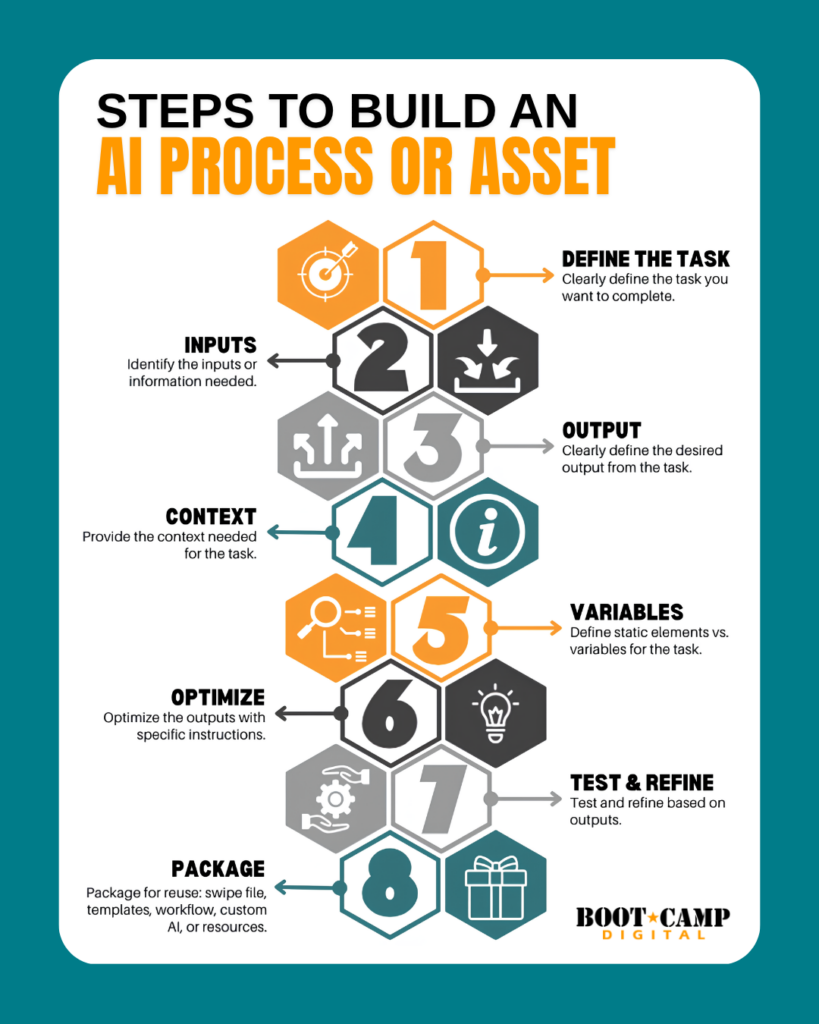
The following eight steps will help you document, test, and refine a repeatable AI process.
Step 1: Define the Task Clearly
Start by identifying the task you want AI to complete and the result you’re trying to achieve.
Specific instructions give AI a clearer direction and make it easier to evaluate the output.
For example, “analyze this spreadsheet” leaves the task open to interpretation.
A more specific instruction would be:
Analyze this month’s marketing performance spreadsheet and summarize the biggest changes in traffic, conversions, and campaign performance.
As you define the task, consider:
- The specific work AI should complete.
- Whether the task will be repeated.
- What a successful result should include.
- Examples of previous work that meets your expectations.
Power Tip: Start with tasks where you’ve already had success using AI. You can build on the instructions and examples you’ve developed.
Step 2: Identify the Inputs
Determine what information AI needs to complete the task.
Inputs may include documents, spreadsheets, background information, examples, or specific instructions. For recurring tasks, establish a consistent way to provide this information.
Boot Camp Digital’s B.R.I.E.F. AI Prompting Framework can help you organize the inputs:
- Background: Relevant context and information.
- Request: The specific task you want completed.
- Intent: The objective or goal.
- End Result: The desired format or outcome.
- Focus: The audience or constraints.
For a marketing report, your inputs might include campaign performance data, marketing objectives, and examples of previous reports.
You can also use AI to identify missing information. Ask it to list the inputs needed to complete the task effectively.
For more guidance on structuring AI instructions, explore the AI: Prompt Like a Pro Master Certification.
Step 3: Clarify the Desired Output
Define the format and requirements for the finished result.
AI can organize information in different ways, so clear output instructions help establish consistency.
Specify details such as:
- Format: Table, paragraph, list, report, or email.
- Length: Word count, number of bullets, or level of detail.
- Tone: Professional, conversational, technical, or another appropriate style.
- Content: Specific information that must be included.
For example:
Create a performance summary with a short executive overview, a table comparing key metrics, and three recommended actions.
For more complex tasks, provide examples of successful outputs. These give AI a reference for the structure, style, and level of detail you expect.
Step 4: Set the Context
Provide the background information AI needs to approach the task appropriately.
For a marketing report, this could include your company’s objectives, target audience, key performance indicators, and reporting priorities.
You can also assign AI a specific role.
Act as a marketing analyst reviewing campaign performance for a business leadership team. Focus on meaningful changes and actionable recommendations.
Include relevant guidelines, constraints, and requirements that may influence the results.
Watchout: Too much background information can introduce conflicting instructions. Focus on the context that directly supports the task.
Step 5: Define the Variables
Identify which information will change each time you use the process.
For example, a social media content creation process might include these variables:
{topic}{target_audience}{platform}{content_goal}
Your brand guidelines, writing instructions, and quality requirements can remain consistent. Each time you use the process, you update the variables with information for the new task.
Clearly explain what should be entered for each variable. If other team members will use the process, include examples of acceptable inputs.
This helps reduce variations caused by incomplete or inconsistent information.
Step 6: Optimize the Instructions
Review the process to make sure the instructions are clear and easy to follow.
Consider how the process will work when someone else uses it. They may provide information differently or interpret instructions in ways you hadn’t anticipated.
Look for areas where you can:
- Simplify complicated instructions.
- Remove unnecessary steps.
- Clarify how information should be provided.
- Address common variations in inputs.
- Explain how to handle missing information.
For example, you could tell AI to request missing campaign data before creating a performance report.
Try to make the process straightforward enough that someone can use it without additional explanations.
Step 7: Test and Refine
Run several different inputs through your process and review the results.
Start with complete, well-organized information. Then test situations where inputs are incomplete, inconsistent, or more complex.
Pay attention to recurring problems.
If AI leaves out important information, review your instructions and required inputs. If the writing style changes significantly between outputs, you may need more specific guidelines or examples.
You can also use AI to review your instructions and suggest improvements.
The Generative AI: Using AI to Prompt AI course explores how to use AI to develop and refine prompts.
Power Tip: Keep a record of problems you discover during testing. Update the process as you find ways to improve the results.
Step 8: Package It for Reuse
Once you’ve tested the process, save it in a format that’s easy to access and use.
Depending on the task, you could create:
- A reusable prompt template.
- A document with instructions and examples.
- A structured workflow.
- A reusable Skill with instructions for completing a specific task, or a Plugin that connects AI to external tools and services.
- A shared resource for your team.
Include the required inputs, instructions, and any limitations identified during testing.
You can also add a quality checklist to help users review the results. For example, a content creation process might include checks for accuracy, brand voice, formatting, and completeness.
For more advanced applications, the Generative AI: Creating AI Workflows course covers building and implementing AI workflows.
Examples of AI Processes You Can Build
Many common business tasks can be turned into repeatable AI processes. Here are a few examples.
Monthly Marketing Performance Reports
Create a process that reviews campaign performance data, identifies important changes, and generates a report.
You could establish standard instructions for analyzing metrics, comparing reporting periods, and presenting recommendations.
Each month, you would update the performance data, reporting period, and campaign objectives.
Social Media Content Creation
Develop a process that creates social media drafts using your brand voice, audience information, and content guidelines.
Your process could include instructions for the type of content, writing style, platform requirements, and review criteria.
Variables might include the topic, target audience, platform, and objective.
Customer Feedback Analysis
Use AI to analyze survey responses, reviews, or customer feedback.
A repeatable process could categorize responses, identify common themes, and highlight issues that deserve attention.
You can standardize the categories, reporting format, and instructions for handling unclear feedback.
These examples can begin as simple prompt templates and become more detailed as you refine them.
How to Improve Your AI Processes
Your AI processes will likely need adjustments as you use them. New situations, changing requirements, and different users can reveal areas for improvement.
A few practices can help maintain quality.
Provide examples of successful outputs. Examples help establish expectations for structure, detail, and style. They’re particularly useful for content creation and complex reports.
Test different types of inputs. Include realistic situations where information is missing, incomplete, or poorly organized.
Include human review. AI-generated information can contain mistakes. Review important claims, analysis, and recommendations before using them.
Document improvements. When you discover instructions that work better, update the process so everyone can benefit.
Review processes periodically. Business requirements, tools, and workflows change. Update your instructions and reference materials as needed.
Pay attention to how much effort the process requires. If users consistently need to correct the same problems, revisit the instructions and inputs.
Building Your First AI Process
Start with a task you already complete regularly using AI.
Review the instructions you’ve used and identify which approaches have produced useful results. Document the task, inputs, context, and desired output using the eight-step framework.
Test the process with different examples and make adjustments based on the results. Once it’s working consistently, save it as a reusable template or workflow.
You can gradually build a collection of AI processes for the tasks you perform most often.
The AI Foundations Master Certification provides training in practical AI applications, prompting, productivity, and workflows.
FAQs About Building AI Processes
What is an AI process?
An AI process is a structured set of instructions, inputs, and steps used to complete a task with artificial intelligence. It provides a repeatable approach for completing similar tasks consistently.
How is an AI process different from an AI prompt?
An AI prompt is an instruction or request given to an AI tool. An AI process defines how a task should be completed, including the required inputs, context, instructions, expected outputs, and quality checks. It may include one prompt or several.
What tasks are best suited for AI processes?
Repeatable, time-consuming, and complex tasks are good candidates. Examples include marketing reports, content creation, research summaries, customer feedback analysis, and recurring administrative work.
Do you need coding skills to build an AI workflow?
No. Many AI workflows can be created using prompt templates, documents, and no-code AI tools. More advanced automation may require technical skills, depending on the systems involved.
How can you improve the consistency of AI-generated results?
Use clear instructions, relevant context, and examples of successful outputs. Standardize your inputs and test the process with different scenarios. Review the results and refine instructions when you identify recurring problems.