
AI can save you time, but how much time are you really saving if you’re constantly rewriting prompts, repeating instructions, and correcting the same mistakes?
One of the biggest challenges with using AI is getting consistent, high-quality results. You might spend time perfecting a prompt, only to find yourself explaining the same requirements again the next time you complete a similar task.
AI Skills offer a better way to work. They allow you to package your instructions, examples, and resources into reusable workflows that AI can follow whenever they’re needed.
Instead of starting from scratch every time, you can invest in creating a strong set of instructions once and continue benefiting from that work. You can also share those instructions with your team so everyone can produce more consistent results.
Here’s how AI Skills work, how to create your own, and how to make sure they’re delivering the results you want.
Summary
- What Are AI Skills? Understand how reusable instructions help AI complete specific tasks.
- Why Use AI Skills? Learn how Skills save time, improve consistency, and help maintain quality.
- What Makes an Effective AI Skill? Explore the components that help Skills work effectively.
- How to Create Your Own AI Skill Discover different ways to build and customize Skills.
- Common Mistakes to Avoid When Building AI Skills Learn what can prevent Skills from performing correctly.
- How to Test and Improve Your AI Skills Use AI to evaluate and refine your Skills.
- Start Building AI Skills for Your Everyday Work Identify opportunities to make recurring tasks more efficient.
- FAQs About Creating AI Skills Answers to common questions about building and using Skills.
What Are AI Skills?
An AI Skill is a reusable package of instructions and resources that tells an AI tool how to complete a specific task.
Think about what it takes to write an effective marketing email. You need to understand email best practices, match the appropriate tone of voice, and know what marketing objective the email is supposed to accomplish.
Those are skills a person needs to complete the task successfully.
AI Skills work in a similar way. They provide AI with the instructions, knowledge, and processes needed to complete a task according to your expectations.
For example, you could create an AI Skill for writing YouTube descriptions. That Skill might include instructions for structuring descriptions, optimizing them for search, incorporating relevant links, and following your brand’s writing style.
Once you’ve created the Skill, you don’t need to explain those requirements every time you need a new description.
When you ask AI to write a YouTube description, it can recognize the task and use the relevant Skill to complete it. You can also directly tell AI which Skill to use.
Skills can work within regular AI conversations, projects, and agent workflows. They can also be shared and used across compatible AI platforms.
The difference between a regular prompt and an AI Skill is reusability. A prompt provides instructions for an individual interaction, while a Skill packages those instructions into a process you can use repeatedly.
Why Use AI Skills?
The biggest benefit of AI Skills is that you can stop repeating instructions.
If you’re regularly using AI for similar tasks, you probably have certain requirements you want it to follow every time. Rather than explaining those requirements repeatedly, you can build them into a Skill.
There are three major benefits to this approach.
1. Save Time on Repetitive Tasks
Creating an effective Skill requires an upfront investment.
You need to think through the task, define your expectations, document your instructions, and test the results.
However, that investment can save time every time you use the Skill afterward.
For example, I spent approximately two hours creating and optimizing a YouTube Description Optimizer Skill for Boot Camp Digital.
That initial work included defining our requirements, establishing best practices, and refining the instructions until the Skill produced the results we wanted.
Now, anyone on our team can use that Skill to create YouTube descriptions without needing me to explain the process each time.
The time spent building the Skill continues to provide value.
2. Improve Consistency Across Your Team
When multiple people complete the same task, their approaches and outputs may differ.
A shared AI Skill helps establish consistent standards by giving everyone access to the same instructions.
For example, a social media caption Skill can contain your brand’s tone of voice, formatting preferences, and writing guidelines.
Instead of relying on each team member to remember every requirement, those expectations are built directly into the Skill.
This helps create more consistent outputs, even when different people are completing the work.
3. Maintain or Improve Quality
One of the most overlooked benefits of building Skills is that they encourage you to think more carefully about what makes an output effective.
When you’re completing a task quickly, you might provide AI with a handful of instructions and hope for a good result.
When you’re building a Skill, you have an opportunity to consider the entire process.
What makes the output successful? What should it include? What mistakes should AI avoid? What examples would help communicate your expectations?
By answering these questions upfront, you can create more detailed instructions that improve the quality of future outputs.
Key Takeaway: Think of AI Skills as an investment. Instead of spending a little time repeatedly correcting the same tasks, spend more time upfront creating a process that produces better results over time.
What Makes an Effective AI Skill?
An AI Skill can contain several components. Each plays a different role in helping AI understand when and how to complete a task.
1. Skill Name
Your Skill’s name should clearly communicate what it does.
For example, “BCD Social Caption Writer” immediately identifies the task and the organization it supports.
A clear naming convention is particularly helpful when you’re managing multiple Skills.
You want both AI and the people using your Skills to recognize their purpose.
2. Skill Description
The description is one of the most important components because it helps AI determine when to use the Skill.
When you’re chatting with AI, it doesn’t necessarily review every instruction and reference file from every available Skill.
Instead, it uses Skill descriptions to identify which ones are relevant to your request.
A strong description should explain what the Skill does, when it should be used, and when it should not be used.
It’s also important to consider the different ways someone might describe the task.
For example, someone who needs a YouTube description might ask for help with “video copy,” “video SEO,” or “publishing a video.”
Including relevant variations in your description can help AI recognize when the Skill should be used.
Be specific about boundaries as well. If your Skill is intended only for YouTube descriptions, make that clear so AI doesn’t apply it to unrelated writing tasks.
3. Skill Instructions
Your instructions tell AI exactly how to complete the task.
Start by defining the goal and what a successful output should accomplish.
Then explain the process AI should follow.
Numbered steps are particularly useful because they establish a clear sequence.
For example, a YouTube description Skill might require AI to review the video transcript before drafting the description.
You can also include requirements for formatting, tone of voice, content structure, and anything AI should avoid.
The more clearly you communicate your expectations, the easier it is for AI to follow them.
4. Examples, Templates, and Reference Files
Instructions are important, but examples can be even more effective.
You might spend considerable time describing your writing style, but showing AI examples of content you like can communicate those preferences much more clearly.
For a social media caption Skill, you could include several approved captions that demonstrate your preferred writing style.
You can also include reference files containing brand guidelines, templates, or other information AI needs to complete the task.
Be specific about what each example demonstrates.
An example might illustrate your tone of voice, while another shows the formatting you expect.
More advanced Skills can also include scripts that extend their functionality, although these require coding knowledge.
How to Create Your Own AI Skill
You don’t need coding experience to create an instruction-based AI Skill.
There are several ways to get started, depending on how much of the process you’ve already defined.
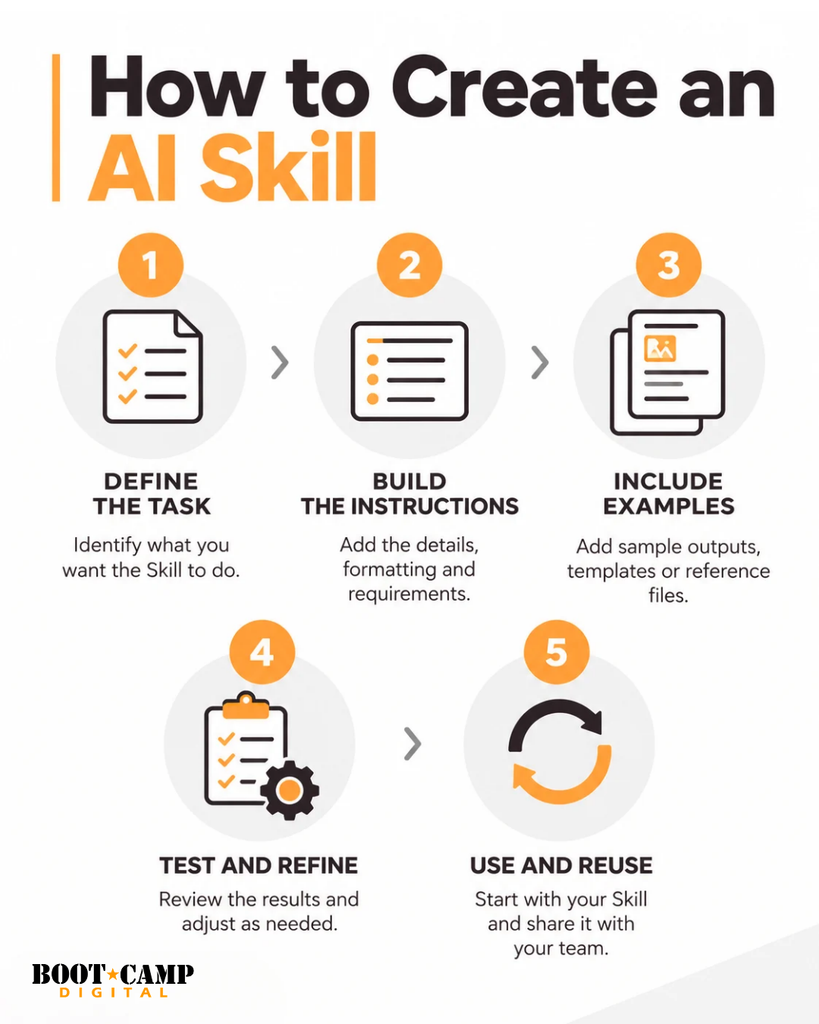
Step 1: Define What a Successful Output Looks Like
Before creating a Skill, start by understanding the task itself.
This is one of the most important parts of the process.
If you’re creating a Skill for writing YouTube descriptions, don’t immediately ask AI to build the Skill.
First, think about what makes a good YouTube description.
What information should it include? How should it be structured? What are your SEO requirements? What should the final output look like?
You can use AI to help evaluate best practices, review examples, and organize your requirements.
Once you know what a successful output looks like, you’re in a much better position to create instructions that consistently produce it.
Step 2: Choose How to Build Your Skill
There are several approaches you can use.
Create a Skill Through Chat
One of the easiest ways to create a Skill is to use a conversational Skill Creator.
You can explain what you want to accomplish, and AI can help you develop the instructions.
However, don’t assume the initial questions will cover everything.
You may need to provide additional details, examples, and feedback to create a sufficiently thorough Skill.
Create a Skill Using the Editor
If you already know exactly what you want, you can build the Skill directly in an editor.
You can define the name, description, instructions, and supporting resources yourself.
This gives you more direct control over the structure and requirements.
Upload an Existing Skill
You can also start with an existing Skill.
Skills can be downloaded and uploaded into compatible AI environments.
If you find a Skill that already handles a similar task, you can use it as a starting point and customize the instructions for your needs.
Step 3: Turn Successful AI Conversations Into Skills
One of the easiest opportunities to create Skills comes from work you’re already doing with AI.
Imagine you’ve spent time developing a client proposal.
You’ve provided instructions, reviewed the results, made revisions, and refined the output until you’re satisfied.
Instead of repeating that process the next time you need a proposal, you can ask AI to create a Skill based on the conversation.
The Skill can capture the instructions, preferences, and improvements you developed along the way.
This allows you to turn successful AI conversations into reusable workflows.
Look for tasks where you’ve already invested time refining AI outputs. Those conversations can provide a strong starting point for creating Skills.
Common Mistakes to Avoid When Building AI Skills
Even well-developed Skills can produce inconsistent results.
If your Skill isn’t working as expected, there are several common issues worth reviewing.
Trying to Do Too Much With One Skill
A Skill that handles too many different tasks can become difficult for AI to follow.
For example, writing a blog post involves several distinct activities.
You need to determine the strategic direction, organize the content, write the article, apply the appropriate tone of voice, and format everything for your website.
Initially, I tried combining all these requirements into one blog-writing Skill.
The results weren’t consistent because AI frequently missed instructions.
Separating the writing process from the website formatting process helped improve performance.
If your Skill repeatedly misses requirements, consider whether you’re asking it to do too much.
Sometimes, two focused Skills work better than one complicated Skill.
Creating Overlapping Skills
When multiple Skills have similar descriptions, AI may struggle to determine which one to use.
For example, you might have separate YouTube description Skills for two different brands.
If their descriptions overlap, AI could select the wrong one.
Make the differences clear in your descriptions.
You can also include instructions requiring AI to ask a clarifying question when it isn’t clear which Skill should apply.
Not Including Examples
Examples are one of the most effective ways to communicate what you want.
If you’re creating a Skill that needs to match a particular writing style, don’t rely exclusively on written descriptions.
Provide examples of content that reflects the style you want.
The same applies to formatting, structure, and other requirements.
Explain what AI should learn from each example so it understands how to apply it.
Failing to Update Your Skills
A Skill that works well today may need adjustments later.
AI models change, and those changes can affect how instructions are interpreted.
Your own requirements may also evolve.
Review your Skills periodically and update them when you notice changes in performance.
How to Test and Improve Your AI Skills
Creating a Skill is only the beginning.
You also need to evaluate whether it’s following your instructions and producing the results you expect.
One effective approach is to use AI to evaluate your AI Skill.
Step 1: Generate a Sample Output
Start by using your Skill to complete a real task.
For example, provide a video transcript and ask your YouTube Description Optimizer Skill to create a description.
Review the result to see whether it meets your expectations.
Step 2: Open a Separate AI Conversation
In a new conversation, explain that you want AI to evaluate how well your Skill is performing.
Provide the Skill’s instructions and a sample output.
Ask AI to identify which instructions were followed and which were missed.
This gives you a structured way to evaluate the Skill against its requirements.
Step 3: Review the Results
AI can compare the output with your instructions and identify discrepancies.
For example, an evaluation might reveal that the Skill produced five paragraphs when you requested a maximum of four.
It might also identify missing explanations, incorrect formatting, or deviations from a template.
Not every difference requires a correction.
You need to determine how important each issue is and whether it affects the quality of the final result.
Step 4: Refine the Instructions
If an important requirement is being missed, make your instructions more explicit.
For example, rather than saying a description should contain two to four paragraphs, you could add a clear requirement that it must never exceed four paragraphs.
Then test the Skill again.
You should also evaluate the output yourself.
Does it sound natural? Does it match your tone of voice? Is the information organized effectively? Does it actually accomplish the task?
AI can help identify technical differences between instructions and outputs, but you still need to evaluate the overall quality.
Power Tip: Combine your own review with an AI evaluation. This helps you identify missed requirements while maintaining control over the quality of the final output.
Start Building AI Skills for Your Everyday Work
AI Skills aren’t limited to marketing.
You can create Skills for writing emails, analyzing data, developing presentations, producing training resources, and completing many other recurring tasks.
The best place to start is with something you’re already doing regularly.
Think about the tasks where you repeatedly provide the same instructions, make similar corrections, or spend time refining outputs.
Those are opportunities to create a Skill.
Start with one task you understand well. Define what a successful result looks like, build your instructions, and test the Skill with real examples.
Once it’s working, you can continue refining it and share it with others who complete similar work.
Over time, you’ll build a collection of reusable processes that reflect your standards, preferences, and expertise.
The goal isn’t simply to complete tasks faster.
It’s to create a more effective way of working with AI, where you’re investing in better instructions once instead of repeatedly solving the same problems.
FAQs About Creating AI Skills
What is an AI Skill?
An AI Skill is a reusable package of instructions and resources that helps an AI tool complete a specific task. It can include instructions, examples, templates, and reference files that guide how AI performs the work.
How are AI Skills different from regular prompts?
A regular prompt provides instructions for an individual interaction. An AI Skill packages instructions into a reusable workflow that can be applied whenever a relevant task arises, reducing the need to repeat requirements.
Do you need coding experience to create AI Skills?
No. You can create instruction-based Skills through a conversational Skill Creator or an editor without writing code. More advanced Skills can include scripts that require coding knowledge.
Can AI Skills be used across different AI platforms?
Yes. Skills can be downloaded, uploaded, and reused across compatible AI platforms, including ChatGPT and Claude. Support varies by platform, and many Microsoft Copilot environments do not support Skills in the same way.
Why isn’t AI automatically using my Skill?
Your Skill’s description may not clearly explain when it should be used. Review the description to ensure it includes relevant task terminology, alternative ways someone might describe the task, and clear boundaries.
Can you create an AI Skill from an existing conversation?
Yes. After refining an output through an AI conversation, you can ask AI to create a Skill based on the instructions, feedback, and improvements developed during that conversation. This allows you to reuse a successful process.
How do you know whether an AI Skill is working correctly?
Test it with a real task and compare the output against its instructions. You can also use a separate AI conversation to identify missed requirements. Review the results yourself and refine the instructions where needed.