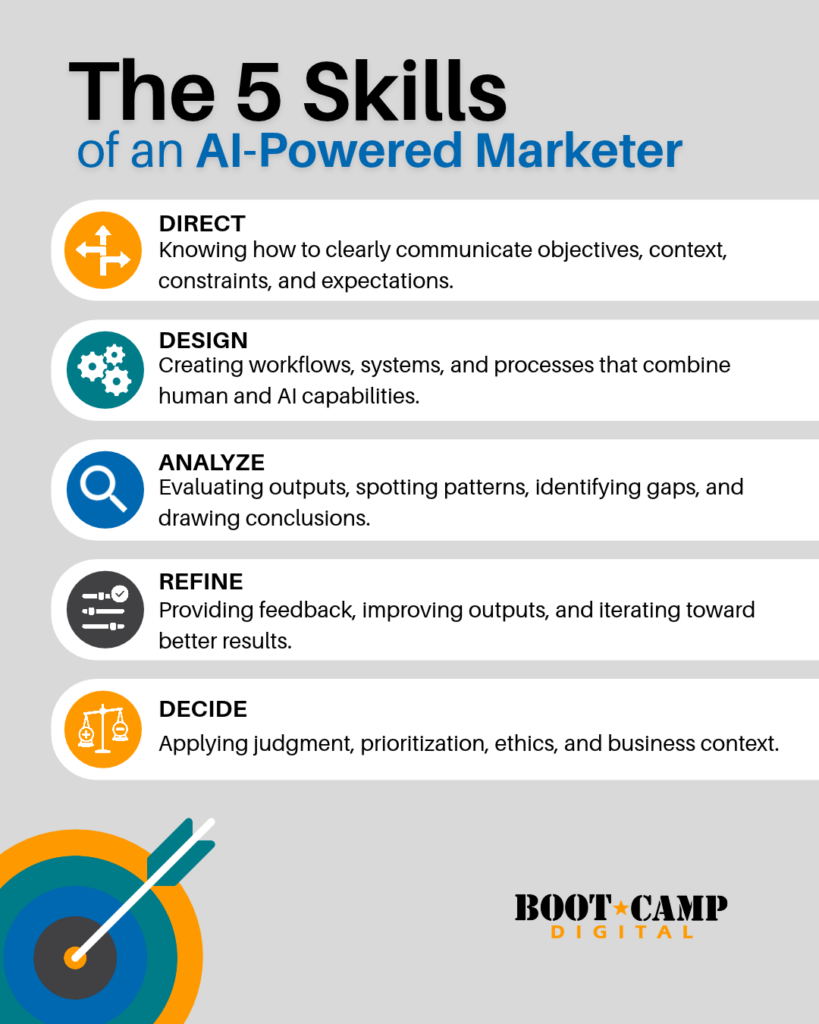


Being effective with AI requires more than knowing how to write prompts. You need a broader set of skills that help you direct AI, design better workflows, evaluate results, improve outputs, and make smarter decisions.
Summary: The 5 AI Skills Professionals Need
- Direct AI Clearly – Better direction creates more specific and useful AI outputs. You need to give AI the right context, objective, and expectations instead of relying on generic prompts.
- Design AI Workflows – Strong AI use goes beyond one-off prompts. You need to understand the real process behind a task and decide where AI can support each step.
- Analyze AI Outputs – AI can produce polished work that is still wrong, incomplete, or strategically weak. Your expertise is essential for evaluating whether the result is actually useful.
- Refine AI Results – The first response should rarely be the final response. Specific feedback helps AI improve the output and move closer to what you actually need.
- Make Better Decisions With AI – AI can help you compare options, identify criteria, and surface trade-offs. The goal is to improve your judgment, not replace it.
AI is changing how we work, but one of the biggest changes is getting less attention: AI is also changing the skills we need to be good at our jobs.
Most professionals were hired because they brought a specific set of strengths. A salesperson might be great at negotiation, relationships, organization, or closing. A marketer might be strong at strategy, writing, creative thinking, or analytics.
Those skills still matter. At the same time, professionals are increasingly expected to use AI effectively, and that requires a different layer of capability.
The mistake is assuming AI proficiency mostly comes down to learning prompts. Prompts matter, but the people getting the most value from AI are usually developing five broader professional skills: directing, designing, analyzing, refining, and decision-making.
These skills are not limited to ChatGPT or any other single platform. They change how you approach the work itself.
I recently worked with an executive who initially didn’t see a big role for AI in his work. He already had employees preparing information for him, so if he wanted data in a different format, he could simply ask someone to reorganize it.
Then we put one of his spreadsheets into AI. Instead of clicking through tabs and figuring out where everything lived, he could ask questions directly: What changed the most? Where are the biggest gaps? Which areas should I pay attention to?
His reaction changed immediately because the value wasn’t that AI could make a spreadsheet. The value was that it changed how he interacted with the information.
That is where the real opportunity is.
1. Directing AI: Learn How to Tell AI What You Actually Need
Directing is the ability to clearly communicate what you want AI to do, and it is much closer to managing people than most professionals realize.
If you tell an employee, “Make me a presentation,” you probably won’t get exactly what you want. They need to understand the topic, the audience, what people should know or do afterward, how long the presentation should be, and which information matters most.
AI has the same problem when your instructions are vague. If you are not clear about what you want, it has to fill in the gaps.
Why Generic AI Prompts Create Generic Results
One of the biggest complaints I hear about AI is that the output feels generic. Sometimes that is a limitation of the tool, but often the problem starts with the direction.
Imagine asking AI:
Review this webpage.
What does “review” mean?
You could be asking for:
- An SEO review
- A conversion review
- A brand consistency review
- An accuracy check
- A customer-experience assessment
- An analysis of likely customer objections
Each of these requires a completely different lens. When you ask a vague question, you should expect a broad answer.
Big Idea: Generic AI output is often caused by generic direction.
Good directing does not mean every prompt has to be three pages long. It means you give AI the information that is actually relevant to the work.
That may include:
- Your objective
- Your audience
- Relevant constraints
- Examples
- Background information
- Data or files
- A description of what a strong result looks like
Give AI Useful Context, Not Random Prompt Ingredients
There are plenty of prompt frameworks that tell you to include a role, audience, tone, background, output format, and other ingredients every time you use AI.
Those elements can help, but they are not automatically useful.
Telling AI, “You are an expert marketer,” might improve the perspective of a marketing task. Adding a role simply because a template told you to, however, does not guarantee a better answer.
A better question is: What does AI actually need to know to complete this task well?
That shift sounds small, but it is important. You are no longer trying to follow a prompt formula. You are trying to communicate clearly.
Break Complex AI Tasks Into Smaller Steps
Another directing mistake is asking AI to jump immediately to the finished output.
For example, imagine asking AI to “write a high-performing marketing email for this product.” On the surface, that seems reasonable, but a strong email requires several decisions before the writing starts.
You need to know:
- What is the objective?
- Who is the audience?
- What is the most compelling message?
- Why should the reader care?
- What is the call to action?
- What objections might the reader have?
If you skip those decisions, AI fills them in for you. Sometimes it guesses well. Sometimes it produces something polished but strategically weak.
For complex work, direct AI through the thinking process first. Ask it to help you define the audience, clarify the message, compare possible angles, and then create the draft.
Power Tip: When the output isn’t strong, don’t automatically rewrite the same prompt. Ask yourself whether the task should be broken into stages.
Voice prompting can also help. When people speak, they often provide more context naturally because they explain what they mean, add examples, and mention caveats they would never bother typing.
That additional context can make a big difference.
2. Designing AI Workflows: Stop Thinking in Prompts and Start Thinking in Processes
The second skill is designing, and in this context, I am not talking about graphic design. I mean designing how the work gets done.
This is one of the biggest shifts between beginner and advanced AI use.
When most people start with AI, they think one prompt at a time: write this email, summarize this report, give me ideas, analyze this spreadsheet.
That is useful, but it only scratches the surface. More advanced users start asking a different question: What is the actual process behind this task?
Design the Work Before You Automate It
Go back to the marketing email example.
Writing the words is only one part of creating a good email. A more realistic workflow might look like this:
- Define the business objective.
- Identify the audience.
- Choose the core message.
- Clarify the value proposition.
- Select the call to action.
- Create the structure.
- Draft the email.
- Evaluate the draft.
- Refine the final version.
Once you can see the process, you can decide where AI adds value.
Maybe AI helps you identify customer needs. It can challenge the value proposition, suggest possible structures, create the first draft, critique the result, and help you refine it.
That approach is much stronger than asking for a finished email immediately because it preserves the strategic thinking behind the work.
Choose the Right AI Setup for the Job
Once you understand the workflow, you can decide how AI should support it.
Some tasks only need a simple chat. Others may be better suited to:
- A reusable prompt
- A project with reference files
- A custom AI setup
- An automation
- An AI agent
- A workflow that combines human and AI steps
You do not need the most sophisticated solution. You need the right solution for the job.
Experienced professionals already think this way with traditional software. You do not spend 20 minutes debating whether a calculation belongs in Excel or PowerPoint because you intuitively understand what each tool does best.
Over time, AI should become the same way. You should start seeing a task and recognizing how AI can support it almost automatically.
If you want to build stronger AI processes in marketing, Boot Camp Digital’s Advanced AI for Marketing Boot Camp focuses on practical AI workflows, content, campaigns, analytics, and execution.
Action Item: Choose one task you repeat every week and write down the real steps involved before you try to automate anything.
That exercise alone often reveals much bigger AI opportunities than another list of prompts ever will.
3. Analyzing AI Outputs: Use Critical Thinking Before You Trust the Result
AI can produce a huge amount of work very quickly, which creates a new problem: someone still has to decide whether the work is actually good.
This is why analysis may become one of the most important professional skills in an AI-powered workplace.
I tend to see three common reactions when people receive AI output.
Reaction 1: Critical Evaluation
This is the ideal response. You review the output, check whether it makes sense, identify what is missing, challenge assumptions, and apply your own professional expertise before using it.
Reaction 2: Passive Acceptance
This happens when the output looks polished enough that you assume it must be good.
You skim it, see that it is organized, and move on. The problem is that something can be grammatically correct, detailed, and visually impressive while still being strategically wrong.
A polished answer is not necessarily a good answer.
Reaction 3: AI Insecurity
This reaction concerns me the most.
Sometimes professionals read an AI response and think, “This doesn’t seem right, but maybe AI knows better than I do.” That is where people begin to give away judgment they should still own.
AI can process far more information than you can. It can spot patterns, generate alternatives, and bring up ideas you had not considered, but those capabilities do not erase your expertise.
They make it more valuable.
Why Detailed AI Output Is Not Always High-Quality Output
Imagine asking AI to create an article outline.
It may return 12 sections, detailed sub-points, examples, FAQs, and SEO recommendations. At first glance, it looks impressive.
An expert may still notice:
- One section does not answer the main question.
- An important concept is missing.
- Two sections repeat each other.
- The structure does not reflect how customers actually think.
- The recommendations are technically correct but practically weak.
Someone without subject-matter knowledge can easily mistake the amount of information for quality.
That is dangerous.
I’ve spent decades working in digital marketing and training professionals. My value is not replaced because AI can produce a marketing plan in 20 seconds. My expertise helps me determine whether that marketing plan is any good.
Use the “What, So What, Now What” Framework to Evaluate AI
This connects to a framework I’ve used for years when teaching analytics: What. So What. Now What.
- What: What did the AI produce or identify?
- So What: Why does that information matter?
- Now What: What should you actually do with it?
The data or output tells you what happened. Analysis tells you why it matters. Professional judgment determines what you should do next.
The same principle applies to AI. The output is not the end of the process; it is an input into your thinking.
Watch Out: AI confidence is not the same thing as AI accuracy.
4. Refining AI Results: Give Better Feedback to Improve the Output
The fourth skill is refinement, and it is one of the most overlooked parts of effective AI use.
People often judge AI based on the first response. If the output isn’t strong, they decide the tool failed.
But think about how you work with another person. You probably would not expect an employee, writer, designer, or agency partner to perfectly understand what you want on the first try.
You give feedback. You clarify. You improve the work together.
AI works the same way.
Why “Make It Better” Is Bad AI Feedback
When people do not like an AI result, they often type something like, “Make this better.”
Better how?
Do you want it to be:
- More persuasive?
- More concise?
- More specific?
- More professional?
- More interesting?
- More strategic?
AI cannot reliably act on a vague standard unless you define what “better” means.
The quality of your refinement depends on your ability to identify the gap between what you wanted and what you received.
Give AI Positive and Specific Direction
Instead of saying, “Don’t make it so serious,” tell AI, “Make the tone more conversational and add light humor.”
Instead of saying, “Make it crisper,” try, “Cut approximately 25% of the words, remove repetition, and keep the examples.”
Instead of saying, “I don’t like the opening,” explain the issue: “Start with the business problem rather than explaining the technology. Make the first paragraph feel urgent but not dramatic.”
That kind of feedback gives AI something concrete to do.
Power Tip: Don’t critique AI like a frustrated customer. Give feedback like a good manager.
Strong managers do more than point out that something is wrong. They explain what needs to change and what a better result should look like.
That same skill improves AI output dramatically.
Refining AI Requires Knowing What Good Looks Like
This is another reason professional expertise still matters.
You cannot give useful feedback if you do not know what a strong result looks like. A strong marketer can refine marketing work. A strong salesperson can refine a sales message. A strong analyst can challenge an analysis.
AI does not remove the need for expertise. It shifts more of your value toward directing, evaluating, and improving the work.
For professionals ready to go beyond basic AI use, Boot Camp Digital’s Advanced AI and Power Users Boot Camp focuses on advanced strategies, workflows, tools, integrations, and AI systems for work.
5. AI Decision-Making: Use AI to Improve Judgment, Not Replace It
The final skill is decision-making, and this may be one of the most powerful uses of AI.
The goal is not to ask AI to make your decisions for you. The goal is to use AI to make your own thinking more deliberate.
Imagine I ask AI to give me 30 potential blog post titles. Now I have 30 options, and the beginner question is, “Which one is best?”
I don’t love that question because “best” depends entirely on the criteria.
Instead, I might ask AI to:
- Group the titles by approach.
- Identify the criteria I should use to evaluate them.
- Compare which titles are strongest for SEO versus click-through.
- Identify which titles are best for a senior executive audience.
- Explain the trade-offs between the strongest options.
Now AI is supporting the decision process rather than replacing it.
Use AI to Define Your Decision Criteria
Years ago, I served on a committee evaluating potential conference speakers.
We had a list of speakers, and everyone was sharing opinions: “I like this person,” “This topic sounds better,” or “I don’t think that speaker is strong enough.”
Then someone asked a simple question:
What criteria are we actually using?
That changed the entire conversation.
We were not really disagreeing about the speakers. We were using different standards.
One person cared most about credibility. Someone else cared about audience appeal. Another person cared about presentation experience.
Once those criteria were visible, the decision became easier.
AI is excellent at helping you surface those hidden criteria. You can ask:
- What factors should I consider?
- What might I be missing?
- What are the trade-offs?
- How would the recommendation change if cost mattered more than speed?
- What could make this option risky?
Those questions make your thinking more deliberate.
Change the Criteria and See How the Recommendation Changes
One of my favorite ways to use AI in decision-making is to change the priority and see how the answer moves.
For example, I might ask AI to rank article titles based primarily on SEO, then rank them again based on click-through, and finally rank them for a senior executive audience.
The order will probably change. That is useful because it exposes the trade-offs behind the decision.
Big Idea: AI can make you a more deliberate decision-maker when you use it to clarify the criteria behind your judgment.
Do not outsource your judgment. Improve it.
How to Build Better AI Skills at Work
You do not build these five skills by reading more AI news or collecting more prompt templates. You build them through deliberate use on real work.
Start with a task you already understand well, because that gives you a strong basis for evaluating what AI produces. Then practice moving through the full process.
- Give better direction. Explain exactly what you want, provide relevant context, and define the desired outcome.
- Design the process. Identify the real steps behind the task and decide which parts AI should support.
- Analyze the output. Do not confuse polished with correct. Use your professional expertise to identify what is missing, weak, or wrong.
- Refine specifically. Tell AI exactly what needs to change and give clear, positive direction.
- Use AI to support the decision. Ask it to identify criteria, compare trade-offs, test scenarios, and surface considerations you may have missed, but make the final call yourself.
That is how you move from casual AI use to professional AI proficiency.
Why Critical Thinking Is the Most Important AI Skill
There is a lot of discussion about what AI will do for us. It will write, analyze, research, design, plan, and create.
All of that matters, but I think the bigger shift is what humans will increasingly need to do around that work.
We will direct the work, design the process, evaluate the result, refine what is weak, and make the final decision.
That means critical thinking becomes more important, not less.
You do not need to memorize hundreds of prompt tricks to become good at AI. You need to become better at thinking clearly about the work, communicating what you want, and recognizing whether the result actually serves the goal.
That is the real AI skill, and it will matter far beyond whichever AI tool happens to be popular today.
Frequently Asked Questions About AI Skills for Business Professionals
What skills do you need to use AI effectively at work?
The most important AI skills for business professionals are directing, designing workflows, analyzing outputs, refining results, and decision-making. Prompting is part of directing, but effective AI use also requires critical thinking and professional judgment.
Is prompt engineering still an important AI skill?
Yes, but prompt engineering is only one part of effective AI use. A strong prompt helps AI understand your task, context, and expected result, while more advanced users also know how to break work into steps, evaluate the output, refine it, and build repeatable workflows.
How can professionals improve their AI prompting skills?
Start by being more specific about the task, objective, audience, context, and constraints. Give AI the information it actually needs, and for complex tasks, break the work into stages instead of asking for the finished result immediately.
Why is critical thinking important when using AI?
AI can produce information that sounds confident and polished even when it is incomplete, inaccurate, or strategically weak. Critical thinking helps you determine whether the output actually makes sense and whether it should be used.
Should you trust AI to make business decisions?
AI can support business decisions, but you should not blindly outsource judgment to it. Use AI to identify criteria, generate options, compare trade-offs, test scenarios, and reveal missing considerations while keeping responsibility for the final decision.
How can you use AI to automate repeatable workflows?
Start by documenting the real process behind the task. Identify the steps, inputs, decisions, and outputs, then determine which parts AI can complete or support. Once the process works reliably, you can explore reusable prompts, custom AI tools, automations, or agents.
What is the best way to improve AI-generated content?
Evaluate the first output against clear criteria and give specific feedback. Do not simply ask AI to “make it better.” Explain exactly what needs to change, such as reducing the length, adding examples, changing the tone, reorganizing the structure, or making the recommendation more specific.